
While building trust gives teams the ability to reconfigure and “do the right thing,” it is also necessary to make sure that team members know what the right thing is. Team members must all work toward the same goal, and in volatile, complex environments that goal is changeable.
—General Stanley McChrystal, Team of Teams
Team Backlog
The Team Backlog is a Kanban system that is used to capture and manage the user stories and enablers intended to enhance the solution.
Details
The team backlog holds all the possible work that a team might do to enhance the solution. For example, it contains User Stories, Enablers, and other work items such as improvement stories for corrective actions from the team’s Retrospectives or the ART’s Inspect and Adapt.
While it’s not conceptually complex, some essential aspects make the team backlog critical for Agile development. For example:
- It contains all the work for an Agile Team to advance the solution and aligns all team members to a common goal.
- It’s a list of wants, not commitments. Items can be estimated (preferable) or not, but it is just an ordered list, and there is no specific time commitment for completion. In other words, the backlog is time-independent, giving the team general flexibility regarding what gets implemented and when.
- All team members can enter stories into the backlog.
- It has an owner—the Product Owner (PO)—who helps the team manage the challenge of multiple stakeholders who may have divergent views of what’s essential.
The PO, with input from the team and other stakeholders, is primarily responsible for creating and maintaining the team backlog. However, any team member can enter an item into the backlog for consideration. The PO prioritizes the backlog, balancing the needs of stakeholders. There are three primary inputs to the team backlog, as Figure 1 illustrates.
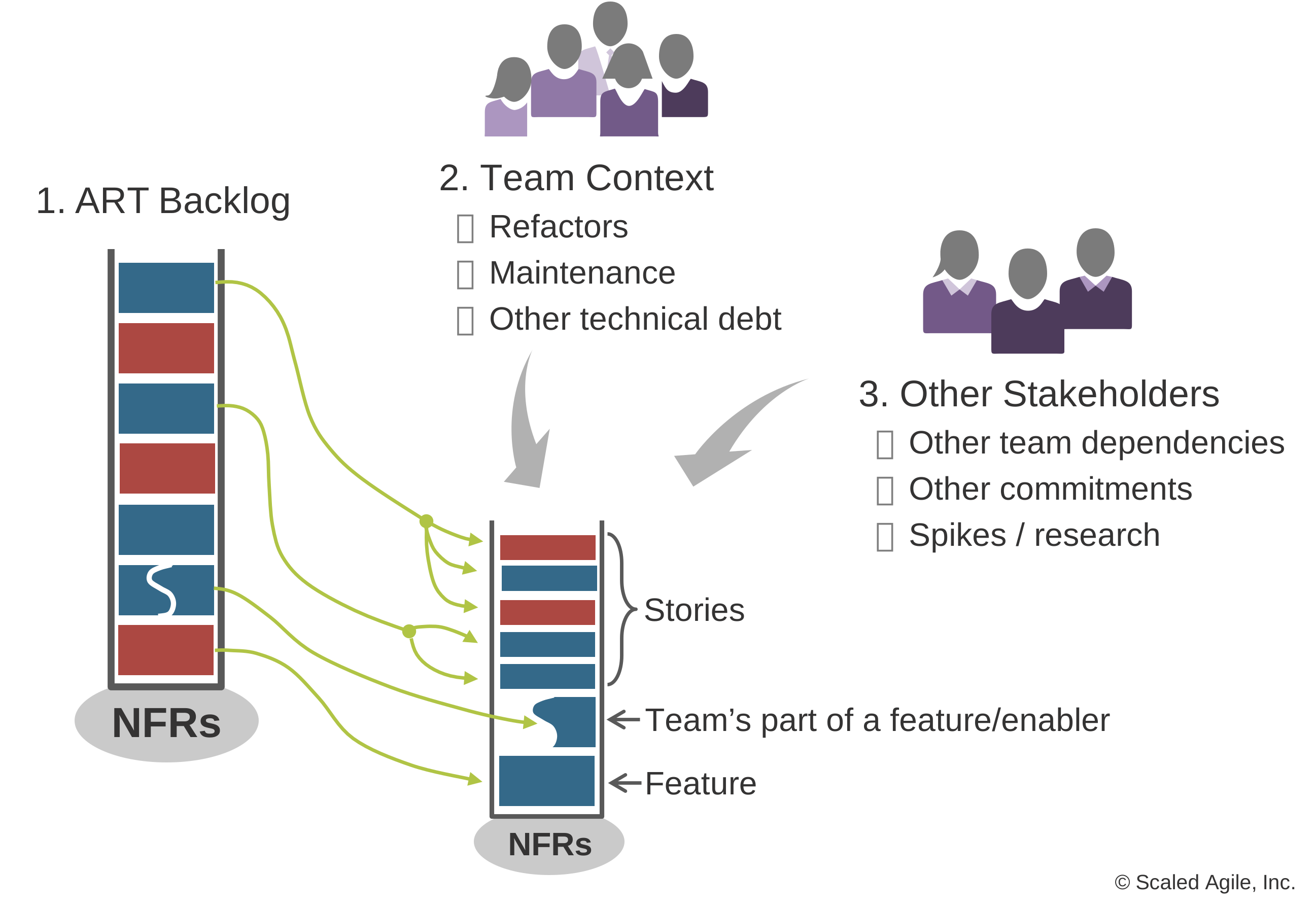
- ART Backlog – The ART Backlog consists of upcoming features planned to be delivered by a train. During PI Planning, teams split the candidate features into stories and tentatively place them into upcoming Iterations. These new stories are maintained in the team backlog.
- Team’s local context – The team’s local concerns (other new functionality, defects, refactors, tech debt, and maintenance) are also in the backlog. Since PI planning is high-level, adjustments will likely occur during the PI. Teams using Scrum will probably make adjustments during Iteration Planning, while teams applying Kanban will likely do the same during backlog replenishment.
- Other stakeholders – Agile Teams on the ART are not islands, and their backlogs will contain some stories that support other teams’ dependencies and other commitments, including the ART’s PI Objectives. These stories may include spikes for research required to estimate Features, Capabilities, and even Epics.
Moreover, teams get feedback from previous increments, the System Demo, and other groups that may affect the backlog.
Nonfunctional Requirements (NFRs) are persistent qualities that may affect the solution’s design, performance, or quality. Since they serve as constraints (or restrictions) for all the team’s items, the Big Picture illustrates them at the bottom of the backlog in Figure 1. Due to their importance, teams often automate acceptance tests for NFRs and include them in their definition of done (DoD).
Building and Refining the Backlog
Agile Teams take a continuous, flow-based approach to maintain backlog readiness, so it always contains some stories ready for implementation without significant risk or surprise. Like a neglected garden that grows wild when left unattended for too long, the team backlog becomes unmanageable if not given care and attention. Refining the team backlog includes the following activities:
- Refining stories and establishing acceptance criteria
- The PO regularly prioritizes the team backlog in collaboration with the team and stakeholders
- New stories, including enablers, are discovered and described, and existing ones are changed or removed
- High-priority items are readied by defining acceptance criteria and sizing them to fit within small timeboxes
- Stories that have been around too long, or perhaps are no longer relevant, are removed
Although the PO manages the team backlog, refinement is a collaborative process. It creates a dialogue between the team, Customers, and other stakeholders. This refinement breaks down barriers between the business and the development team, eliminating waste, handoffs, and delays. Developing story acceptance criteria increases the clarity of the requirements, leverages the team’s collective knowledge and creativity, and creates buy-in and joint ownership.
There is no prescriptive meeting pattern for refining the backlog. Some teams like to do a bit of backlog refinement after their Team Sync. Others prefer weekly refinement sessions or requirements specification workshops, applying Behavior-Driven Development (BDD) techniques to help clarify stories. Since multiple teams often collaborate on feature development, new issues, dependencies, and stories will likely arise. Backlog refinement also helps surface problems with the current plan, which may require discussion at the team, PO, or coach syncs.
Managing the Backlog with Kanban
In SAFe, Agile Teams manage their backlog using a Kanban system. The backlog Kanban system facilitates alignment, visibility, and dependency management. Figure 2 illustrates an example of one team’s initial Kanban system.
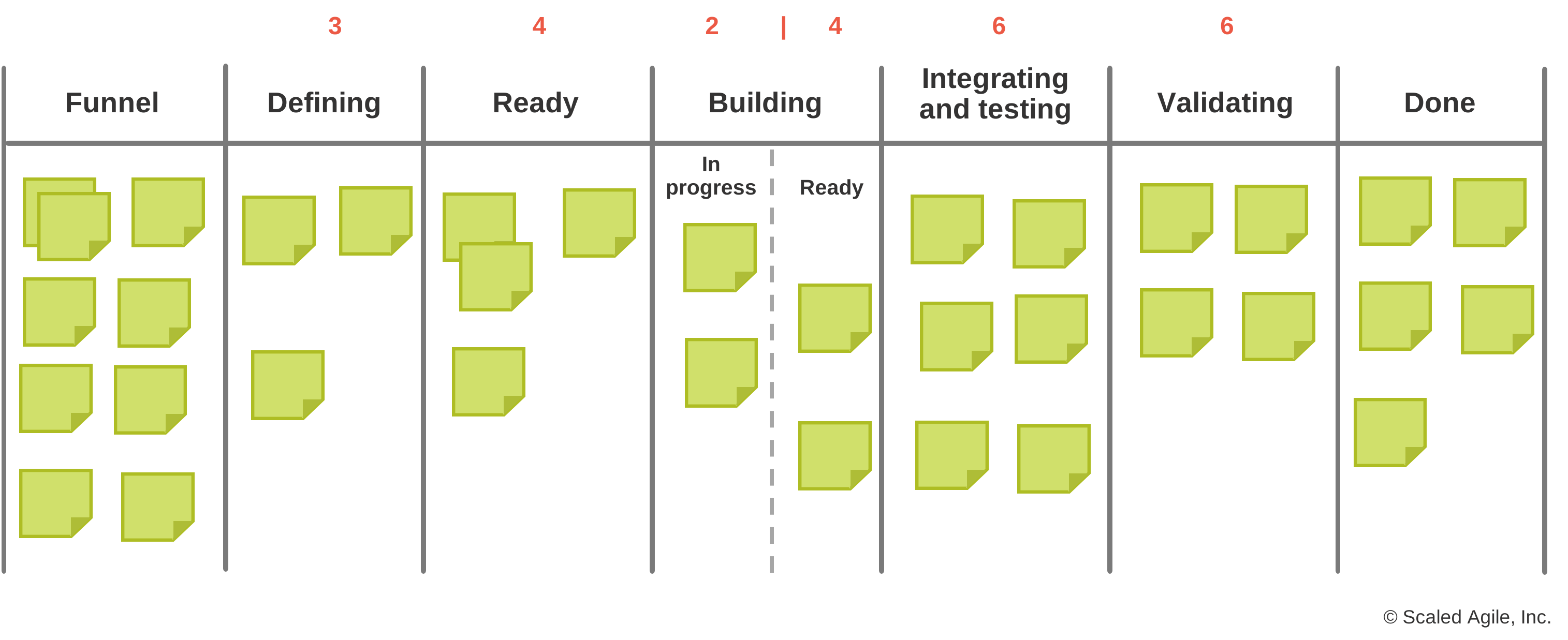
This Kanban visualizes all active and pending work, workflow states, and work-in-process (WIP) limits. The system is WIP limited; a work item can be pulled into the next step only when the number of items is lower than the WIP limit. A few activities in the Kanban (typically beginning and end) may not be WIP-limited. The team defines and adjusts WIP limits, allowing it to adapt quickly to the flow of complex system development variations.
See the Applying Kanban in SAFe and SAFe Team Kanban articles for more information on establishing the team Kanban system.
Balancing Value Delivery and System Health with Capacity Allocation
Like the ART, every Agile Team faces the problem of balancing internal work—maintenance, refactors, and technical debt—with the new user stories that deliver more immediate business value. While focusing solely on business functionality may work for a while, this approach will be short-lived as technical debt increases, ultimately slowing development velocity. Avoiding this risk requires continuous investment in evolving the solution’s Architectural Runway while making customers happy with enhancements, new functionality, and bug fixes. Getting this balance right extends the system’s life, deferring technical obsolescence.
But prioritizing different types of work can be challenging as the PO tries to compare the value of unlike things: defects, refactors, redesigns, technology upgrades, and new user stories. And there is no upper limit to the demand for any of these things.
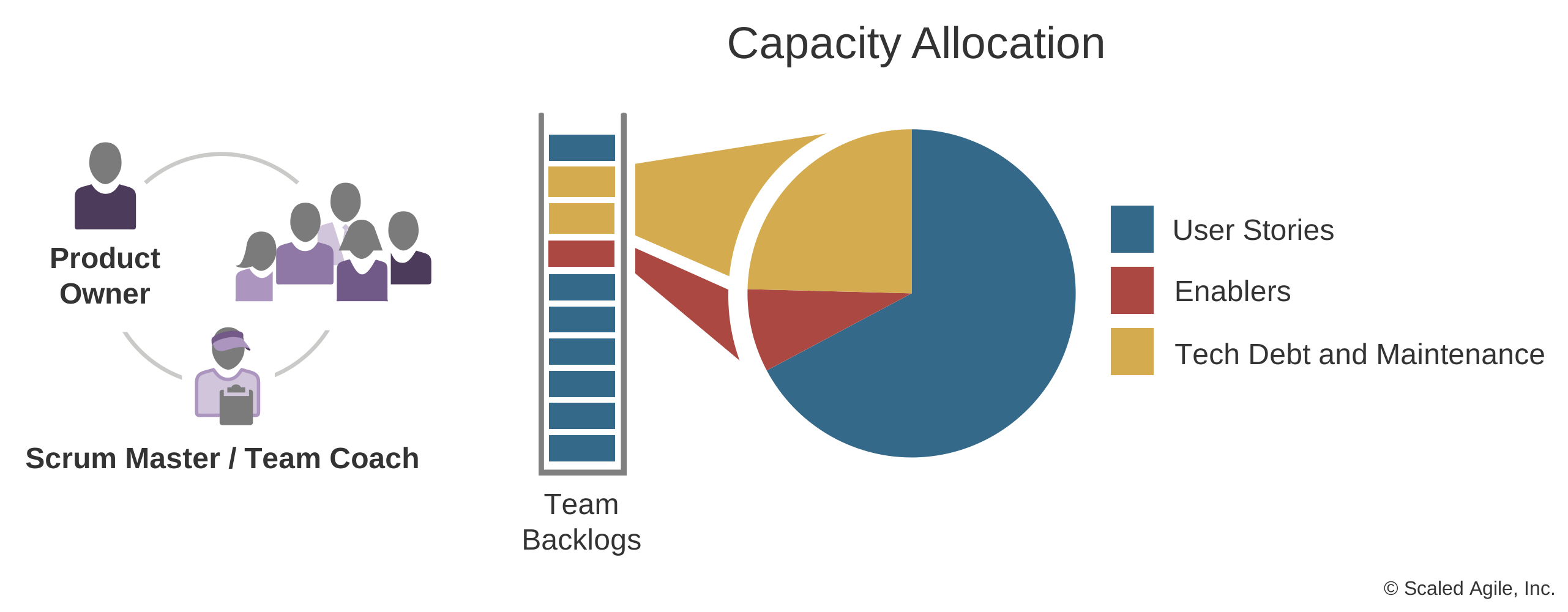
In collaboration with the team, the PO applies capacity allocation (Figure 3) for each item type. Then the PO, team, and System Architect select the highest-priority backlog items for each capacity allocation slice during planning. Since many stories originate from features, PI planning commitments may predetermine some priorities. However, the PO can prioritize work from the team’s local context by comparing value, size, and logical sequencing. Also, the PO can adjust the allocation percentage for each work item type to address long-term system health and value delivery. Teams should adapt the capacity allocation categories as needed. However, these categories should be consistent across teams in the ART.
Learn More
[1] Knaster, Richard, and Dean Leffingwell. SAFe 5.0 Distilled, Achieving Business Agility with the Scaled Agile Framework. Addison-Wesley, 2020. [2] Leffingwell, Dean. Agile Software Requirements: Lean Requirements Practices for Teams, Programs, and the Enterprise. Addison-Wesley, 2011.
Last update: 14 March 2023